


MyICON - Icon Changer, Themes
3.7763.00 Reviews
App Specs
- Version
- 1.2.3
- Updated On
- License
- Free
- Downloads
- 10,000,000+
- Developer
- Zhengzhou Junying TECHNOLOGY CO LTD
- Categories
- Personalization
- Platform
- Android, iOS
Screenshots
 Analysis by AppCompare
When I decide to refresh a phone’s home screen, I usually want a visible change without spending the evening rebuilding everything. That is the practical appeal of MyICON - Icon Changer, Themes: it is a personalization app for changing the look of app icons, themes, and wallpapers while keeping the phone itself familiar. I see it as a hands-on styling tool rather than a replacement for Android’s settings or a full alternative launcher.
Start with the screen you actually use
Before opening a customization app, I find it helps to decide what feels wrong with the current home screen. Is it the icons that look inconsistent, the wallpaper that makes them hard to see, or a general lack of visual order? Choosing one goal first makes it easier to judge whether a new look works, instead of changing several things at random and ending up with a busier screen.
That small bit of planning matters with icon customization. A set can look appealing in a preview but feel tiring when repeated across every page. I would begin with the home screen I open most often, then check whether the style suits the apps I use every day. If I mainly want a calmer layout, a restrained visual direction is more useful than selecting the most elaborate option simply because it stands out.
Move from a visual idea to a consistent setup
MyICON is aimed at people who enjoy making their phone feel more personal without needing to redesign the whole device. The app brings icon changes, themes, and wallpapers into one customization flow, so I can think about those elements together rather than treating the background and icons as unrelated decisions. That is useful when I want a coordinated result, but it also means I should check the whole screen as I go.
A practical workflow is to pick the wallpaper first, then consider the icon style against it. Light icons can lose definition on a pale background, while a detailed wallpaper can compete with decorative icons. I would also keep the most-used apps easy to recognize. A home screen can be attractive and still slow me down if every icon has a similar shape or color.
The app is free to download, and it is published by Zhengzhou Junying TECHNOLOGY CO LTD. Its current version is 1.2.3 and it requires Android 5.0 or later. The age rating is Everyone, so the basic audience is broad. I would still treat a customization session as a small design task: make one choice, look at it on the actual home screen, and only then decide what to change next.
Make the handoff to your home screen thoughtfully
Changing an app’s appearance is not always the same as changing how the phone launches or organizes apps. That distinction is worth keeping in mind when comparing icon tools with a launcher. A launcher can alter the broader home-screen experience, while a focused personalization app is a better fit when I mostly want a new visual layer and do not want to relearn everyday navigation.
Worth Reading Before You Choose

EA SPORTS FC Mobile 26 Is a Bigger Football Game, but It Takes Time

Flipboard Shows What News Apps Must Do Beyond the Feed

Switching to Android Auto Means Rethinking Your Driving Routine

Google Calendar Makes a Crowded Week Easier to Manage

Ludo King Makes the Most of the Minutes Between Plans

Baby Panda World Brings Quick Play to Modern Phones, but Its Game Library Feels Busy
After applying a style, I would check the screen in ordinary conditions: with the usual wallpaper visible, alongside the widgets I already rely on, and at the times of day when I use the phone most. The key question is not whether a preview looks polished, but whether I can spot the right app quickly. If a visual choice makes familiar apps harder to identify, I would change that choice rather than forcing myself to adapt.
What a realistic refresh looks like
Imagine I have a busy weekday ahead and keep reaching for the same handful of apps. I want the home screen to feel less cluttered, but I do not want to move everything around or replace my usual setup. I can use MyICON to explore a new icon-and-wallpaper look, then judge it against the apps I actually open. If the change makes those shortcuts easier to pick out and the screen more pleasant to glance at, the refresh has done its job.
That is a better test than aiming for a perfect screenshot. A home screen is used in motion, between tasks, and often while attention is elsewhere. I would favor clarity over matching every icon exactly. For example, keeping a familiar arrangement while changing the visual treatment gives me a way to personalize the phone without adding a second learning curve.
Another useful approach is to treat customization as reversible experimentation. I would try a coherent look on one screen before committing to a more ambitious redesign. That gives me a chance to notice mismatches—an icon that disappears into the background or a palette that clashes with a widget—before the whole phone feels unfamiliar. This is a small but worthwhile trade-off: slower changes can produce a more usable result than applying everything at once.
Where this app fits among the alternatives
The usual alternatives are to keep the manufacturer’s default appearance, change only the wallpaper, or install a launcher that offers broader control over the home screen. Those approaches suit different needs. A wallpaper-only change is quicker if I like my icons already; a launcher makes more sense if I want to reorganize how the phone behaves. MyICON is most relevant when the visual identity of the icons and the overall look are the main things I want to adjust.
I would not choose it as my first option if my real problem is app organization, gesture behavior, or a completely different home-screen layout. Those are launcher-level concerns. I also would not spend time customizing every shortcut if I prefer the speed and consistency of the default icons. In that case, changing the wallpaper—or leaving the home screen alone—is a simpler answer.
Free to try, with a sensible spending check
The app is free, but it includes in-app purchases ranging from $0.99 to $39.99 per item. I would explore the free experience first and decide whether the available choices already meet my needs before paying for anything. The broad price span makes it especially sensible to check the specific item and its cost at the point of purchase rather than assuming that every extra is a small add-on.
That matters because visual customization can encourage browsing long after the home screen is already good enough. I would set a clear stopping point: if I have found a look that is comfortable and recognizable, there is no need to keep searching for a more elaborate version. Anyone who wants a completely free, no-purchase customization routine should keep that possibility of paid extras in mind when deciding whether the app suits them.
Useful checks before settling on a design
A few quick checks help me avoid a makeover that looks good only in the editor. First, I look at icon contrast against the chosen wallpaper. Second, I check whether the apps I use most remain easy to distinguish. Third, I make sure the visual changes do not undermine the way I already find things on the home screen. These checks are more valuable than chasing a perfectly uniform grid.
I would also think about how often I enjoy changing the phone’s appearance. If I like seasonal or mood-based refreshes, a dedicated personalization app may be a pleasant place to browse. If I only want to change something once and then forget about it, the default wallpaper controls may be enough. MyICON is strongest for someone who sees the home screen as a small creative space, not as a project that needs constant attention.
A few limits worth weighing
There is a real balance between expression and convenience. The more distinctive the visual treatment, the more important it is to preserve recognizability. A set of icons can look cohesive while making individual apps less obvious, especially when the user relies on quick visual cues. I would not sacrifice that everyday clarity just to make every shortcut match.
There is also a difference between customizing what a screen looks like and changing the phone’s deeper behavior. If a reader expects a theme to solve clutter, improve organization, or change how apps open, they may be looking for a different kind of tool. MyICON’s appeal is its visual focus; that focus is a limitation only when someone arrives expecting a broader system makeover.
MyICON has an average rating of 3.7 from around 93,000 ratings, with more than 10 million installs. I take that as a sign that it has reached a large audience, not as a guarantee that every device or personal taste will produce the same experience. It is still worth judging the finished screen for yourself, because icon preferences are unusually subjective: a style that feels fresh to me may feel too decorative or distracting to someone else.
Ever felt the urge to spice up your phone’s home screen? If you’re anything like me, the default icons and themes can get a bit... well, boring. That's where MyICON - Icon Changer, Themes comes into play. This app is all about giving your smartphone a fresh new look without having to overhaul the entire system. Let's dive in and see what this app is all about!
First Impressions: A Splash of Color
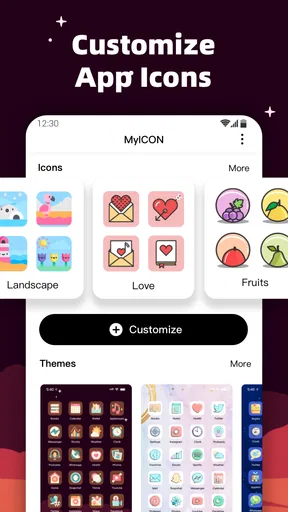
When I first launched MyICON, I was greeted with a vibrant and user-friendly interface. The design is sleek, and it’s clear that the developers put a lot of thought into the user experience. Navigating through the app was a breeze, and I immediately felt excited to start customizing.
Customization Galore
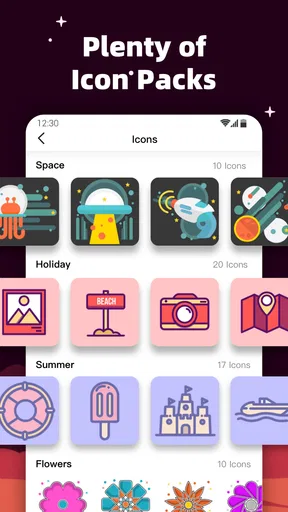
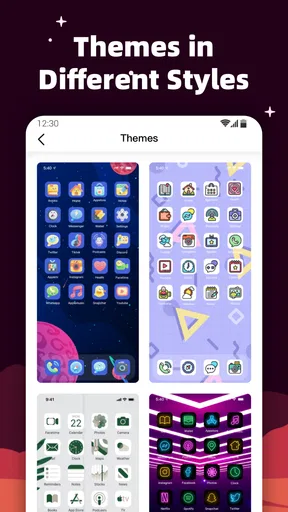
One of the standout features of MyICON is the sheer variety of icons and themes available. Whether you’re into minimalist designs or something more extravagant, there’s something for everyone. The app offers a wide range of categories to choose from, including nature, abstract, and modern.
What’s really cool is the ability to mix and match different icon packs with themes. For instance, you can pair a sleek, modern icon pack with a vibrant, colorful theme. The possibilities are endless, and it’s a lot of fun experimenting with different combinations.
Easy Peasy Installation
Installing new icons and themes is as simple as pie. The app guides you through the process with clear instructions, and within minutes, your phone can feel like a completely new device. There’s a handy tutorial for first-timers, which I found quite helpful.
Performance and Compatibility
I was pleasantly surprised by how smoothly the app runs. It doesn’t hog resources, which is always a plus in my book. MyICON is compatible with a wide range of Android devices, and I didn’t encounter any hiccups while using it on my trusty phone.
However, it’s worth mentioning that some features are locked behind a premium version. While the free version offers plenty to play with, the premium benefits, such as exclusive icon packs and ad-free experience, might be tempting for those who really want to go all out.
A Personal Touch
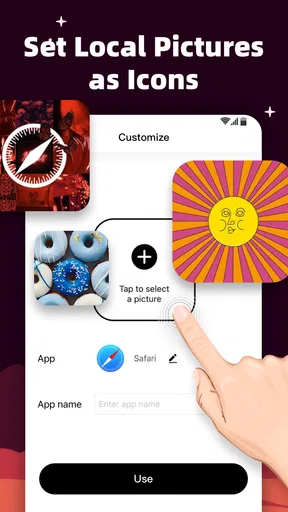
One of my favorite features is the option to create custom icons. You can upload your own images or choose from a variety of shapes and colors to craft something truly unique. This feature adds a personal touch to your device, making it truly yours.
Community and Updates
The app has a lively community where users can share their creations and get inspiration from others. Regular updates keep the app fresh with new content and improvements, which is always a good sign of an engaged development team.
One neat aspect is the seasonal themes that get released around holidays or special events. It’s a fun way to keep your phone in tune with the times, and I found myself eagerly awaiting new releases.
Final Thoughts
All in all, MyICON - Icon Changer, Themes is a fantastic app for anyone looking to give their phone a little makeover. It’s user-friendly, packed with options, and offers a great way to express your personality through your device. Whether you’re a customization newbie or a seasoned pro, there’s something here for everyone.
So, if you’re ready to ditch the default and dive into a world of endless possibilities, give MyICON a try. Trust me, your home screen will thank you!
Pros
- Highly customizable interface.
- Wide range of theme options.
- Easy-to-use design tools.
- Regular updates with new icons.
- Supports various app icons.
Cons
- Limited free icon choices.
- Occasional app crashes.
- Ads can be intrusive.
- Some themes require payment.
- May slow down older devices.
FAQs for MyICON - Icon Changer, Themes
What is MyICON - Icon Changer, Themes?
MyICON - Icon Changer, Themes is an app designed for users who want to customize their smartphone's appearance. It allows you to change app icons and apply various themes, providing a unique and personalized look to your device. The app offers a wide range of icon styles and themes to choose from.
How easy is it to use MyICON for changing icons and themes?
Using MyICON is straightforward. The app features a user-friendly interface that guides you through the process of selecting and applying new icons and themes. Simply browse through the available options, select your preferred style, and follow the on-screen instructions to implement the changes on your device.
Are there any costs associated with using MyICON?
MyICON is free to download, but it does offer in-app purchases. These purchases can include premium icon packs and exclusive themes. If you want access to the full range of customization options, you might consider some of these paid features. However, there are plenty of free options available too.
Does MyICON affect the performance of my device?
MyICON is designed to run smoothly on both Android and iOS devices. While it uses some system resources to change icons and themes, it typically does not have a noticeable impact on overall device performance. It’s always a good idea to ensure your device is updated to the latest software version for optimal performance.
Is MyICON compatible with all apps on my device?
While MyICON supports a wide range of popular apps, there may be some limitations with less common applications. The app is regularly updated to expand compatibility, but it’s recommended to check if your most-used apps are supported. You can also suggest new apps for support through the app’s feedback feature.


